

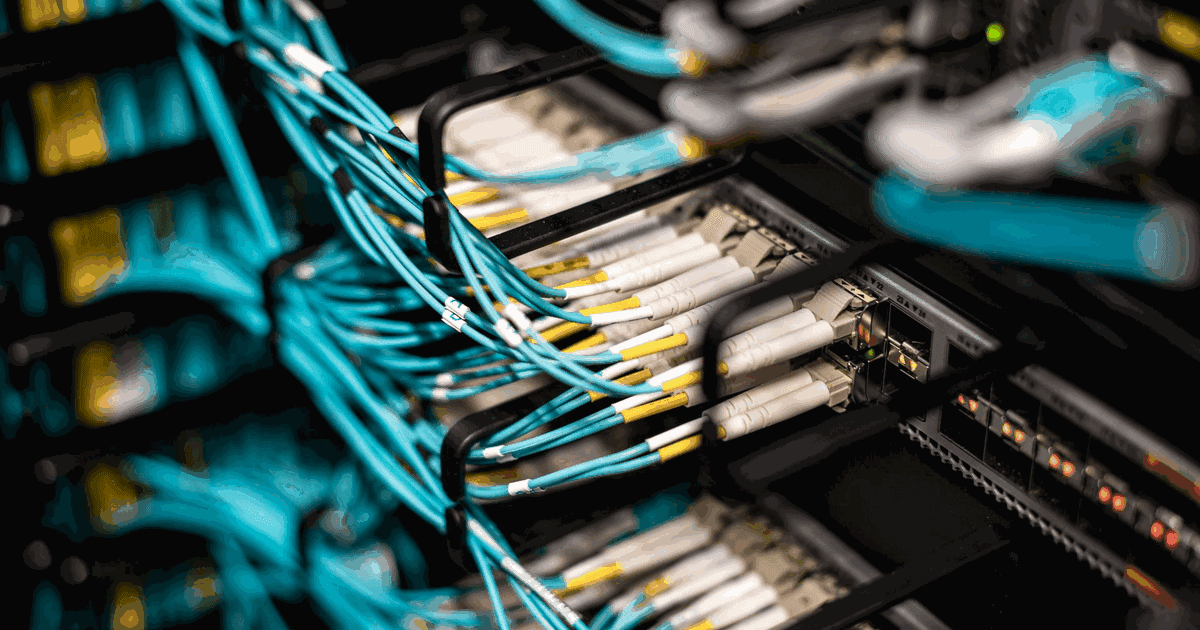
A structured cabling system is the physical layer that every network, phone, camera and access point in your building depends on. Most people only notice it when something fails. For facility.
A structured cabling system is the physical layer that every network, phone, camera and access point in your building depends on. Most people only notice it when something fails. For facility managers in the UAE, the bigger risk comes later: a handover with no test reports, missing drawings and a warranty nobody can claim. This guide explains how cabling is designed, which standards matter, how to choose copper or fibre for each zone and how links are tested. It closes with the documents you should demand before you sign off the installation.
Key Takeaways
A structured cabling system follows recognised standards, so any compliant device can plug into any outlet and the manufacturer warranty stays valid.
Choose cable by zone: copper for most work areas, fibre for backbones and long runs, with capacity for WiFi, CCTV and telephony.
Never accept handover without full test reports, as built drawings, a labelling schedule and the warranty certificate.
What a Structured Cabling System Includes
Structured cabling is an organised, standards based way to wire a building for data and voice. Instead of running a new cable every time someone needs a connection, the building gets a planned network of cables, panels and outlets. Devices then connect through short patch cords. Moves and changes become a quick patching job rather than a new installation.
A structured cabling system is usually described as a chain of subsystems, from the point where the service provider enters the building to the desk or ceiling where a device connects. Knowing these parts helps you read a proposal, check a drawing and ask the right questions on site.
The benefit is consistency. When every floor follows the same design rules, any technician can find a cable, add a user or replace a switch without guesswork. A structured cabling system also separates the fixed cabling from the active equipment, so you can upgrade switches or phones without touching the cables in walls and ceilings.
Entrance Facility and Equipment Room
The entrance facility is where external services arrive, such as fibre from the telecom operator or links from another building on the same campus. From there, cables run to the main equipment room, which houses core switches, servers, firewalls and the main distribution frame. This room needs cooling, clean power, controlled access and space for growth. In many UAE buildings it doubles as the server room, so it deserves careful planning from the first drawing.
Backbone Cabling and Telecom Rooms
Backbone cabling links the equipment room to telecom rooms on each floor or zone. It usually runs vertically through risers in towers or horizontally across large single storey sites such as warehouses. Fibre is the common choice here because it carries high bandwidth over long distances. Each telecom room holds patch panels, access switches and cable management, and it serves the outlets within its reach.
Horizontal Cabling and the Work Area
Horizontal cabling runs from the telecom room to each outlet. Copper runs of this kind have a distance limit, so larger floors often need more than one telecom room. The work area is where users connect: wall outlets, floor boxes, ceiling points for access points and cameras, and connections for phones and printers. A well planned layout places spare outlets where furniture may move, which avoids costly additions later.
Standards That Protect Performance and Warranty
Standards turn cabling from a collection of wires into a predictable system. They define cable categories, maximum lengths, connector performance, pathway design, labelling and test limits. When an installer follows them, you know the network will support the applications it was designed for, and any future contractor can understand the layout.
Two families of standards dominate. The TIA 568 series from the Telecommunications Industry Association is widely used on projects that follow American practice. The international ISO/IEC 11801 standard covers the same ground with its own class and category names. UAE consultants specify either, and many projects reference both. Related TIA documents cover pathways and spaces, labelling and administration, and bonding and grounding.
Why Standards Matter for Your Warranty
Most cabling manufacturers offer long term system warranties, but only when the installation meets their conditions. Typically that means an installer certified by the manufacturer, components from a single approved range, and every link tested and passed against the relevant standard. If a contractor mixes brands of cable and connectors, or skips testing, the warranty may never be issued. Ask for the warranty terms in writing at tender stage, not at handover.
Local Requirements in the UAE
Beyond international standards, UAE projects must respect local rules. Cable fire performance and penetrations through fire rated walls fall under civil defence requirements, and many consultants specify low smoke zero halogen sheathing in occupied areas. Telecom provider entry and in building telecom infrastructure often follow operator and TDRA guidance. Requirements change, so confirm the current rules with your consultant or the relevant authority before design approval.
Professional bodies also shape good practice. Designers certified by BICSI, the global association for information and communications technology infrastructure, are trained to apply these standards on real projects. A design reviewed by a qualified professional reduces the chance of costly changes during construction.
Choosing Cat6, Cat6A, Cat7, Cat8 and Fibre by Zone
There is no single best cable. The right choice depends on distance, expected speed, power delivery and the life you expect from the building. A practical approach is to divide the building into zones and pick the medium for each. Our detailed comparison of copper and fibre cabling explains the trade offs in depth. This section gives the zone view a facility manager needs.
Copper for Work Areas and Devices
Category 6 cable remains common for desk outlets in offices with standard traffic. Category 6A is now the preferred choice for many new buildings, because it supports 10 Gigabit Ethernet over the full horizontal distance and handles the heat of higher power delivery better. That matters for WiFi access points, PTZ cameras and other devices powered through Power over Ethernet. Category 7 appears mainly in ISO based specifications, while Category 8 is designed for very short, high speed links inside data rooms, not for general floor cabling.
Fibre for Backbones and Long Runs
Fibre links floors, buildings and data rooms. Multimode fibre suits shorter backbone runs inside a building, while single mode fibre covers long distances such as campus links, gatehouses and remote car park cameras. Fibre is also immune to electrical interference, which helps in plant rooms and industrial sites. Plan more fibre cores than today's needs, because pulling new fibre through a full riser later is slow and disruptive.
Working with Fiber Cable Suppliers
Clients sometimes buy cable directly from fiber cable suppliers to save cost, then hand it to an installer. This can backfire. The warranty usually depends on matched components, and a supplier cannot confirm that the installation was done correctly. A better approach is to let the installer specify one approved product range, then check the delivery notes, cable markings and batch details against the approved submittal before the cable is pulled.
Choosing a Cabling Brand: One System From Panel to Outlet
The brand matters less than keeping one brand across the whole channel. Cable, connectors, patch panels and cords from a single manufacturer are tested together. That is usually the condition for a manufacturer system warranty. Mixing a cable from one brand with jacks from another often voids it. The cabling brands we install include CommScope, Panduit, Legrand cabling and connectivity, Siemon, Molex and Nexans. The choice depends on consultant specifications, lead times and the warranty the building owner wants.
Ask your installer three questions. Is the team registered with the manufacturer's installer programme? Will the warranty be issued in the owner's name? Will every link be certified with a test report the manufacturer accepts? A cheaper mix of components can cost more later, when a fault appears and no single warranty covers the channel.
Pathways, Containment, Labelling and Rack Layout
Good cable is easily ruined by poor installation. Pathways protect cables, labelling makes them manageable and rack layout keeps the system serviceable for years. These are the areas where a neat installation and a messy one look very different after two years of moves and changes.
Containment and Separation
Cables should run in cable trays, baskets, conduits or trunking sized with spare capacity for future additions. Installers must respect the minimum bend radius and avoid overtightened cable ties, which can deform cable pairs and cause test failures. Data cables need proper separation from power cables and fluorescent fittings to avoid interference. Every penetration through a fire rated wall or slab must be sealed with an approved fire stopping system after the cables are installed.
Labelling That Survives Future Changes
Every cable, outlet, patch panel port and rack should carry a unique, durable label that matches the drawings and test results. A consistent scheme might identify the floor, telecom room, panel and port, so any technician can trace a link in seconds. Printed labels last far longer than handwriting. Many teams also use colour coded patch cords for different services, such as data, voice, CCTV and building systems.
Rack Layout and Cable Dressing
A well designed rack places patch panels next to the switches they serve, with horizontal and vertical cable managers between them. This keeps patch cords short and tidy. Leave empty rack units for growth, provide enough power distribution units and plan airflow so switches do not overheat. Heavy equipment such as UPS units belongs at the bottom. Dressed, bundled cables look professional, but the real benefit is faster fault finding and safer maintenance.
Telecom rooms need the same discipline as the racks inside them. Keep them locked, free of storage boxes and properly cooled, since UAE summer heat can push small rooms beyond safe temperatures. A structured cabling system stays reliable only when its rooms are treated as technical spaces, not cupboards.
Racks for security systems deserve the same care. Many buildings now run cameras and door controllers on the same infrastructure, so align the cabling plan with your CCTV installation and access control designs from the start. Our overview of ELV systems for modern buildings shows how these low voltage services share pathways and rooms.
Testing and Certification: Copper and Fibre
A link that looks fine can still fail under load. Certification testing proves that each installed link meets the performance limits of its category or class. Without it, you cannot know whether your structured cabling system will run the applications it was designed for, and the manufacturer will not issue a warranty. Testing is not optional. It is the evidence behind everything the installer promises.
Permanent Link and Channel Tests
Copper links are usually tested in one of two configurations. A permanent link test covers the fixed part of the installation, from the patch panel to the outlet, and is the normal test for certification. A channel test includes the patch cords at both ends, so it reflects the full path a device uses. Installers generally certify permanent links, because patch cords are often replaced during the life of the building.
Fluke Testing for Copper Links
Many specifications in the region ask for Fluke testing, because Fluke Networks certification testers are widely used for this work. The name has become shorthand for full certification, but the brand matters less than the test itself. The tester must be a certification grade instrument, calibrated, set to the correct standard and cable type, and fitted with the right adapters. It measures parameters such as wire map, length, insertion loss, crosstalk and return loss, then gives a pass or fail for each link.
Ask for the native tester files as well as PDF summaries. Native files let a manufacturer or an independent consultant verify results. Watch for marginal passes, results marked with an asterisk, and links tested against a lower category than the one installed.
Failed links are normal on large projects, and a good installer expects some. The key is what happens next. Each failure should be investigated, reterminated or replaced, then retested, with the final passing result included in the report. Be cautious if a report shows only passes on a building with thousands of outlets, or if results were produced long before ceilings were closed. Links damaged by later trades may need testing again before handover.
Fibre Loss and OTDR Tests
Fibre is commonly tested with a light source and power meter, which measures total loss across each link and compares it with a loss budget. This is often called basic or Tier 1 testing. An optical time domain reflectometer adds a trace showing each connector, splice and bend along the link. OTDR traces help locate faults and prove workmanship on long backbone and campus runs. Many consultants request both for important links.
Handover Documents Every Facility Manager Should Demand
Handover is where many cabling projects lose their value. The installer leaves, the network works on day one, and nobody notices that the paperwork is incomplete. Months later, a fault, an expansion or a warranty claim exposes the gap. A structured cabling system without records is expensive to maintain, because every change starts with tracing cables by hand.
Make the handover package a contract deliverable with its own payment milestone. Agree its contents before work starts, then review it item by item before practical completion. The core documents fall into two groups, and each one matters for a different reason.
Drawings, Schedules and Test Reports
As built drawings should show every outlet, telecom room, rack, containment route and backbone link as actually installed, not as designed. They should use the same labels as the cables and panels. A cable schedule lists each link with its label, location, length and test result. Test reports should cover one hundred percent of installed links, with the tester model, calibration date, standard applied and the native result files.
Warranty, Materials and Training
The manufacturer warranty certificate should name your building and list the covered link count. Keep the installer certification details, approved material submittals and product data sheets with it. Ask for rack elevation drawings, patching records, fire stopping records and a list of spare materials left on site. A short walkthrough for your IT or facilities team, covering the labelling scheme and rack layout, makes the documents far easier to use.
Do not release retention money until test results are complete and reviewed.
Check a sample of labels on site against the drawings and cable schedule.
Store all records digitally in a shared location your team controls.
WiFi and IP Telephony on the Cabling Backbone
Wireless and voice services are only as good as the cabling behind them. Every access point needs a cable, and every desk phone needs an outlet or a WiFi connection. When cabling is designed with these services in mind, the network is ready for years of growth. When it is not, upgrades mean new cables through finished ceilings.
Planning WiFi Solutions for Business
Effective wifi solutions for business start with a wireless survey that sets access point positions before ceilings close. Each position needs a data outlet, ideally with a spare cable for future upgrades or a second radio. Newer access points can use uplink speeds above one gigabit, which favours Category 6A to ceiling points. If your staff already complain about slow or patchy coverage, our guide on signs your office WiFi needs an upgrade helps you judge whether the cause is cabling, access points or configuration. Our business networking team designs switching and wireless together.
Running an IP Phone System on the Same Network
An IP phone system sends voice over the data network, so phones plug into the same outlets as computers. Many handsets include a built in switch, which lets a computer connect through the phone and saves an outlet. Phones usually draw power from PoE switches, so size switch power budgets and UPS runtime to keep calls running during short outages. Voice traffic also needs a separate VLAN and quality of service settings. Explore our IP telephony solutions for handsets, call management and integration.
Room for Future Services
Modern buildings add connected devices every year: meeting room displays, sensors, digital signage and building management controllers. A structured cabling system with spare outlets, spare fibre cores and room in racks absorbs these changes without major works. Plan capacity for the life of the building, not just the first tenant fit out. If your servers or core switches are moving too, coordinate cabling with data centre planning so backbone routes and rack space match.
Budgeting and Choosing a Cabling Installer
Two quotes for the same building can differ widely, and the cheaper one is not always the better deal. A structured cabling system is priced on quantities, materials and workmanship, but also on how much testing, documentation and warranty support is included. Comparing proposals on a like for like basis protects both your budget and the long term value of the network.
What Shapes the Cost
The main cost drivers are the number of outlets, the cable category, the length of each run and the amount of containment required. Fibre adds cost for cores, termination and splicing, especially on campus links. Work in a finished or occupied building takes longer than work in a shell, because ceilings, furniture and working hours slow progress. Certification testing, documentation and the manufacturer warranty process also take time. Ask every bidder to itemise these areas so hidden exclusions become visible before you award the contract.
Questions to Ask Every Installer
Is your team certified by the manufacturer whose warranty you are offering?
Will your own staff install and test the cabling, or will any work be subcontracted?
Which standard, cable category and test configuration will you certify against?
What exactly will the handover package contain, and in which formats?
How will you protect and phase work in areas that stay occupied?
New Build Versus Occupied Building
In a new build, cabling must be coordinated early with the electrical, mechanical and ceiling contractors, so containment routes and telecom rooms are reserved before other services fill the space. In an occupied building, the challenge is disruption. Installers may need to work after hours, protect furniture, control dust and move users onto new cabling in stages. In both cases, a site survey and a clear programme agreed with your facilities team prevent most delays.
Conclusion
A structured cabling system should outlast several generations of switches, phones and access points. That only happens when it follows the standards, uses the right cable in each zone, passes certification testing and comes with complete records. Treat the handover package as seriously as the installation itself.
Vega Digital designs, installs and tests cabling with its own in house team, and hands over full documentation on every project. Explore our structured cabling services or talk to our engineers about your building and plan a network that is ready for the years ahead.
Frequently Asked Questions
What is a structured cabling system?
It is a standards based network of cables, patch panels, outlets and pathways that carries data, voice and video throughout a building. Devices connect through short patch cords, so moves and changes need patching rather than new cables.
Which cable category should a new office use?
Many new offices choose Category 6A for work areas and ceiling access points, because it supports 10 Gigabit speeds over full horizontal distances and handles higher power delivery. Fibre remains the usual choice for backbone links between floors.
What is the difference between Fluke testing and OTDR testing?
Fluke testing usually refers to copper certification with a Fluke Networks tester, which checks each link against its category limits. OTDR testing examines fibre links and shows the location and loss of each connector, splice or bend.
How long does a structured cabling system last?
A well installed system can serve for many years across several generations of network equipment. Choosing higher categories, spare capacity and quality containment extends its useful life, while poor installation and missing records shorten it.
What documents should I receive at cabling handover?
Expect as built drawings, a cable schedule, full test reports with native files, rack elevations, labelling records, fire stopping records and the manufacturer warranty certificate. Review them before practical completion and before releasing final payment.
Can CCTV and access control share the same cabling?
Yes. IP cameras, door controllers and intercoms often run on the same structured infrastructure, usually on separate VLANs. Plan outlet positions, PoE budgets and rack space together, as described in our access control solutions overview.
Do I need fibre in a small office?
A single floor office with short runs may not need fibre inside the premises. Fibre becomes important when copper distance limits are exceeded, when linking floors or buildings, or where electrical interference is high near plant rooms.
Who maintains cabling after installation?
Your installer or an IT maintenance provider can manage patching records, moves, fault finding and periodic inspections. An annual maintenance contract for IT systems keeps records current and ensures changes follow the original labelling and testing standards.
Does structured cabling support video conferencing rooms?
Yes. Meeting rooms need data outlets for displays, cameras, room controllers and wireless presentation devices. Plan spare outlets and floor boxes early, then coordinate with video conferencing solutions so every device has a reliable wired connection.